
Vizo Lite X
tuyenThucPaPersonalization
4.7167.00 Reviews
- Version
- 1.31
- Installs
- 100.00K
- Age Rating
- Everyone
Screenshots
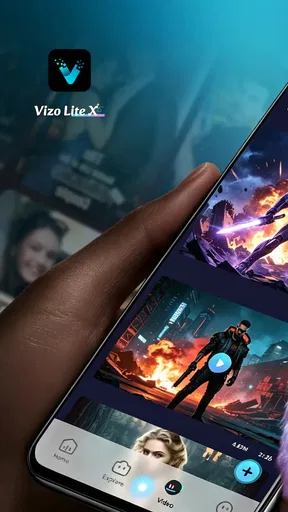

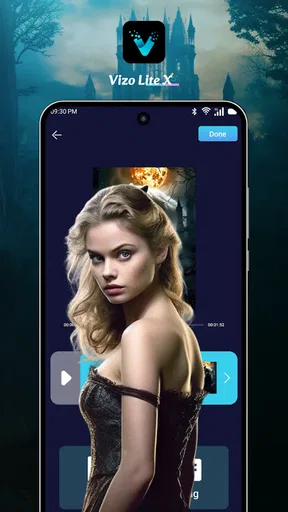
Our Review of Vizo Lite X
 Analysis by Appyee
I spent time with Vizo Lite X as a small, straightforward video-editing app, and its main appeal became clear quickly: it aims to keep the editing process approachable rather than surrounding every task with a crowded professional interface. That makes it interesting for people who want to trim, arrange, and prepare a video without learning a full desktop-style editor first. I also found that its value depends heavily on what kind of editing you need. For quick personal clips, it feels like a sensible place to begin; for complex productions, the lightweight approach can become a limitation.
Published by tuyenThucPa, this free personalization app has a 4.7 average from around 5K ratings and has passed 100K installs. It is rated for Everyone, runs on Android 8.1 or later, and the current release is version 1.31. Those details place it in a useful position for people using older Android phones as well as newer devices. I would not describe it as a replacement for a full creative suite, but I can see why someone looking for a less intimidating editor would give it a try.
How the interface feels when readability matters
My first impression of Vizo Lite X was that its lightweight identity is more important than visual spectacle. In a video editor, that can be a genuine advantage. A busy timeline, a long row of unfamiliar icons, and several layers of controls can make a simple trim feel like a technical project. A simpler layout reduces the amount of information competing for attention, which is helpful for first-time editors and for anyone who prefers a calmer screen.
The most useful way to approach the app is to decide on the finished clip before opening the editor. If I know that I only need to remove the beginning, shorten the ending, or prepare a small video for sharing, the reduced scope works in my favor. I can concentrate on the clip instead of exploring tools that I may never use. This is especially helpful for people who find dense menus tiring or who need to complete an edit quickly.
That simplicity also has a trade-off. A compact editor may make common actions easier to locate, but it gives me less room to build a complicated workflow. Users coming from a large desktop editor may initially look for advanced controls, detailed tracks, or a broader range of adjustments and feel that the experience is intentionally limited. I would recommend treating Vizo Lite X as a focused utility, not as a miniature professional workstation.
For readability, I would use it with the phone held in the orientation that gives the timeline the most comfortable space, then pause after each change to check the preview. That small habit matters because editing on a phone encourages quick taps, and a rushed tap can alter the wrong part of a clip. A simple editor does not remove the need to review; it just makes the review process less intimidating.
Navigation that suits short editing sessions
Vizo Lite X makes the most sense for a start-to-finish task: choose a video, make the necessary adjustment, preview it, and save the result. I would not open it expecting to organize a large library of source material or manage a long production with many moving parts. Its strongest use is the single-clip job that has a clear purpose.
That approach is also useful for people who do not edit regularly. Instead of remembering a complicated sequence of panels and settings, I can return to the basic workflow whenever I need to prepare a clip. A family video, a short demonstration, or a quick recording for a group chat can all benefit from that low-pressure process.
One practical tip is to keep the original recording untouched and work from a copy when the video is important. Lightweight editors are convenient, but convenience can encourage people to move too quickly. Keeping the source available gives me a safe fallback if the result is not quite right or if I later decide I need a different version.
Motor effort and the reality of touch editing
Touch editing is accessible in one sense because it avoids a keyboard and mouse, but it also demands precision. Trimming a clip usually involves dragging or tapping near a small control area, and that can be difficult for someone with limited fine-motor control, hand tremors, or fatigue. Vizo Lite X’s simple presentation may reduce the number of actions I need to perform, yet it cannot change the physical character of phone-based editing.
I found that a slower workflow is more reliable than trying to make several adjustments at once. I would make one change, preview it, and then move to the next. Holding the phone securely, using a stable surface, and avoiding edits while walking or riding in a vehicle can make the experience noticeably easier. These are ordinary habits, but they matter more when the screen is small and the controls are close together.
People who rely on a stylus may find precise selection more comfortable, depending on their device and personal setup. Others may prefer a larger-screen Android device because the timeline and preview have more physical room. Vizo Lite X is therefore a better match for short edits than for long sessions that require repeated dragging, close inspection, or constant repositioning of elements.
There is another motor-related consideration: editing can become tiring even when the final video is short. I would prepare the source material first, decide what needs to be removed, and avoid repeatedly reopening the same clip to make tiny changes. That planning turns the app into a more manageable tool for users who need to conserve hand movement or attention.
Visual and sensory comfort during editing
A video editor asks me to process several kinds of information at once: moving images, a timeline, control labels, and changes in the preview. A lightweight design can help by reducing visual clutter, but it does not automatically make every screen comfortable for every user. People sensitive to motion may want to keep preview checks brief, while people with reduced vision may need to rely on their phone’s own display settings or accessibility tools.
I would avoid judging an edit only from a tiny preview. On a small screen, a cut can appear acceptable while still feeling abrupt when watched normally. A useful routine is to preview the entire result at least once, preferably in a quiet setting, and then watch the transition around the edit point again. This catches timing problems without requiring a complicated feature set.
For users who are easily distracted by sound, I would separate the visual decision from the audio decision. First check whether the clip begins and ends where intended; then listen to the result without simultaneously focusing on the timeline. This two-pass method is a concrete advantage of the app’s simple purpose: I can use it for a narrow task without turning the session into a large production review.
People who need captions, audio description, detailed color work, or careful sound mixing should think carefully before choosing a lightweight editor. Those needs often call for dedicated tools where accessibility and production controls are more explicit. Vizo Lite X may still be useful for a basic trim, but it should not be the only tool in a workflow built around those requirements.
Everyday situations where the smaller approach works
Imagine recording a short explanation for a family member and realizing that the first part contains several seconds of setup. I would open Vizo Lite X, remove the unnecessary opening, watch the beginning and ending, and save a cleaner version for sharing. The task does not need layers, elaborate effects, or a long creative session. This is exactly the kind of situation in which a focused editor saves mental effort.
It can also suit a student who wants to submit a short demonstration, a small business owner preparing a simple product clip, or a relative who wants to shorten a phone recording before sending it. In each case, the important benefit is not that the app transforms the video dramatically. The benefit is that it helps turn an unpolished recording into something easier to watch.
Another useful workflow is preparing several versions of the same recording for different people. I would keep one untouched original, create a shorter version for quick messaging, and retain a longer copy for anyone who needs more context. This is a better use of a lightweight editor than trying to force one file to serve every situation.
Situational access also includes the device itself. Because it supports Android 8.1 and later, Vizo Lite X can be considered by users who are not carrying the newest phone. Still, the editing experience will depend on the individual device, screen size, storage, and general responsiveness. A simple app can reduce interface complexity, but it cannot make every older handset feel equally fast or spacious.
Where the lightweight design starts to show its limits
The main barrier is not that the app is difficult; it is that simplicity may leave experienced users wanting more. If I need a multi-stage project, precise audio work, extensive text treatment, layered visual elements, or detailed export control, I would look toward a more capable editor. Those alternatives usually take longer to learn, but they are better when the project itself is complicated.
There is also a difference between “easy to start” and “easy to finish well.” A basic edit can be completed quickly, but producing a polished result still requires judgment about pacing, framing, sound, and the viewer’s attention. Vizo Lite X can reduce the technical barrier at the beginning, yet it cannot decide which moments should remain in the story. I would use it as a practical tool, not as a substitute for editing decisions.
Users who need a workflow centered on assistive technology should test the app personally before depending on it for important work. Phone-level accessibility settings may help with display size, contrast, touch assistance, or spoken interaction, but the usefulness of those settings can vary from one interface to another. I would begin with a short, nonessential video and check whether selecting, previewing, and saving feel comfortable before committing to a larger project.
Privacy-conscious users should follow the same sensible approach they use with any editor: review what the app asks to access and choose source files deliberately. I would avoid selecting an entire media library when one clip is enough. That keeps the workflow clearer and reduces the chance of accidentally working with the wrong recording.
Who should use it, and who should choose another editor
I would recommend Vizo Lite X to someone who wants a free, uncomplicated way to handle short video edits on Android. It is particularly suitable for occasional users, people with older supported devices, and anyone who feels overwhelmed by editors packed with professional controls. Its Everyone age rating also makes its general positioning easy to understand for households looking for a basic creative utility.
I would be more cautious about recommending it to a creator whose work depends on repeatable, highly controlled production. If a project requires several visual and audio layers, demanding timing, or a large set of finishing options, a more advanced alternative will probably justify its steeper learning curve. The same applies to anyone who spends long periods editing and needs a spacious, highly configurable workspace.
The choice is therefore less about whether Vizo Lite X is “better” than every other editor and more about whether its boundaries match the job. Compared with a full-featured mobile editor, it should feel less demanding but less expansive. Compared with doing nothing to a raw recording, it offers a practical middle step: enough control to clean up a clip without turning a small task into a course in video production.
My inclusive verdict after using the app
Vizo Lite X succeeds when I treat it as a focused, lightweight video editor rather than a complete studio. Its clean direction can support users who value readable, uncomplicated navigation and who want to finish a short task with minimal technical overhead. The free price removes an obvious entry barrier, and its support for Android 8.1 or later broadens its usefulness beyond only recent devices.
Its accessibility story is best understood in practical terms. A less crowded workflow may be easier to follow, short sessions can reduce fatigue, and careful preparation can make touch editing more manageable. At the same time, small-screen precision, preview demands, and the likely limits of a lightweight tool remain real considerations for users with motor, visual, sensory, or production needs.
My advice is to start with a disposable copy of a short video and test the complete routine: selecting the clip, making one change, previewing the result, and saving it. If that feels comfortable, the app is a good candidate for everyday trimming and simple sharing. If you immediately miss deeper controls or find touch editing tiring, a larger and more specialized editor will be the better choice. For the right user, Vizo Lite X is valuable because it keeps a small editing job small, and that is a more meaningful strength than a long list of features.
Verdict
Strengths of Vizo Lite X
- Lightweight app that uses less storage than many streaming alternatives.
- Simple interface makes browsing and playback easy for new users.
- Works smoothly on devices with modest hardware and limited resources.
- Useful option for users seeking a compact entertainment app.
- Quick installation and straightforward setup process.
Limitations of Vizo Lite X
- Content availability may vary by region and change without notice.
- Video quality can depend heavily on your internet connection.
- Some features may feel limited compared with the full Vizo experience.
- Advertisements may interrupt browsing or playback.
- The app may receive fewer updates than larger streaming platforms.
Similar Picks in This Category
View All
Microsoft SwiftKey AI Keyboard
SwiftKey4.3

Wallpapers
Google LLC4.1

Zedge™ Wallpapers & Ringtones
Zedge4.7

Yandex Browser with Alice AI
Direct Cursus Computer Systems Trading LLC4.3

Ringtone Maker:create ringtone
Big Bang Inc.4.7

Fonts Keyboard
Fonts Keyboard3.9
Frequently Asked Questions
What is Vizo Lite X, and what can I use it for?
Vizo Lite X is presented as a lightweight mobile application designed to provide its core features without demanding too much storage, memory, or processing power. It may be suitable for users with older phones, limited free space, or slower connections. Before downloading, check the app’s current store description because available tools, supported devices, and its exact purpose can vary by version and region.
Is Vizo Lite X free to download and use?
Vizo Lite X may be available as a free download, but free access does not always mean that every feature is included at no cost. Some versions of lightweight apps use advertising, optional purchases, subscriptions, or limitations that can be removed through payment. Review the Google Play or App Store listing carefully to confirm pricing, in-app purchases, trial conditions, and whether any recurring charges apply.
Will Vizo Lite X work on my Android or iPhone?
Compatibility depends on the operating system version, device model, available storage, and the release distributed in your country. Although the “Lite” name suggests reduced requirements, it does not guarantee support for every older phone. Check the official store page before installation for minimum Android or iOS requirements, recent update information, developer details, and any warnings about unsupported devices or regional availability.
Does Vizo Lite X require an internet connection or access to personal data?
The connection requirements depend on which functions you use. Basic parts of the app may work offline, while content loading, account synchronization, updates, or online services can require Wi-Fi or mobile data. During installation, examine the permissions requested by Vizo Lite X and grant only those that are necessary. It is also worth reading the privacy policy to understand how account, device, usage, or location information may be handled.
Is Vizo Lite X safe to install and what should I check first?
For the safest installation, download Vizo Lite X only through its official Google Play or Apple App Store listing rather than from unfamiliar APK or third-party websites. Check the developer name, recent update date, user reviews, download count, permissions, and privacy information before proceeding. Keep your operating system updated, avoid modified versions, and uninstall the app if it behaves suspiciously or requests access unrelated to its advertised purpose.
